Stirred Cell Product Redesign Workflow
This project involved redesigning and automating the in-lab stirred cell setup to improve process efficiency and data accuracy during filtration experiments. I established serial communication between an Ohaus Scout Pro scale and a computer using MobaXTerm to enable data transfer and verification. Building on this foundation, I developed a LabVIEW program to control two solenoid valves—automatically directing airflow into or out of the system based on real-time filtrate mass readings from the scale. This setup allowed for fully automated operation and continuous data logging, reducing manual intervention and ensuring more reliable experimental results.
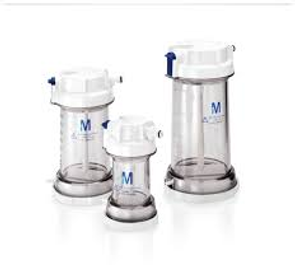
Image 1: Stirred cell product containers
Image 2: In-lab stirred cell setup where stirred cell product containers are placed onto
Images 3 and 4: Ohaus Scout Pro Scale and RS232 Commands
Images 5 and 6: My LabVIEW Front Panel and Block Diagram Code
LabVIEW System Breakdown
1. Select Program Parameters
a. Weight of Desired Output (Filtrate): Target mass of liquid to be collected.
b. Maximum Test Duration (Timeout): Defines the longest allowable test run time.
c. Manifold Selection: Choose which of the four available modules to activate.
d. Filtrate Density Input: User enters the solution density (D).
The system calculates the target mass for 10 mL based on the entered density:
Mass (M) = 10 mL × Density (D)
Mass (M)=10 mL× Density (D)
This allows the program to operate in either drive-to-weight or drive-to-volume mode, depending on the test requirements.
e. Test Description: User enters details such as solute type, applied pressure, and data identifiers.
2. Set Desired Air Pressure Manually
Operator adjusts air pressure to the specified level before initiating the test.
3. Start Test
a. Scale is zeroed.
b. Program activates the solenoid valves to open and begin airflow.
c. Feedback loop begins between the scale readings and the control system.
4. Test Execution
The system continuously monitors filtrate weight and runs until the target liquid volume (e.g., 10 mL) is reached.
5. Test Completion
a. Air valves automatically close once the target is achieved.
b. System resets and is ready for the next test setup.